
Machine
Finished Long Part
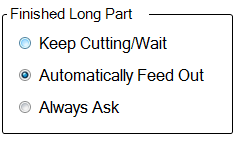
ProfileShop decides whether a finished part is considered a LONG or SHORT part, based on the machines ability to properly grab and automatically feed the finished part through the conveyor system. A LONG PART will be of sufficient length to be properly grabbed and manipulated by the hitch feed system – Usually around 700mm, although this is dependent on specific machine dimensions.
Keep Cutting / Wait can be selected if you do not wish to feed out each LONG PART individually. All parts will simply continue through the machine as if still connected to the next part. They will need to be collected from the end of the conveyor rollers as they feed off the end
Automatically Feed Out will assume that you want to feed each LONG PART to a predefined position on the out-feed conveyor. The operator may still be prompted to check before the machine feeds the part. On the first part the operator will be prompted as to where the part should be deposited.
Always Ask will prompt the operator each time as to what should be done with the completed part
Finished Short Part
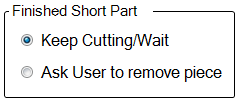
ProfileShop decides whether a finished part is considered a LONG or SHORT part, based on the machines ability to properly grab and automatically feed the finished part through the conveyor system. A SHORT PART will not be of sufficient length to be properly grabbed and manipulated by the hitch feed system – Usually around 700mm, although this is dependent on specific machine dimensions.
Keep Cutting / Wait can be selected if you wish continue cutting after each SHORT PART. The machine does not ask to feed the part but assumes that it will fall away from the stock material after it has been cut. The parts will need to be collected from the inside of the machine after a suitable number have been cut or at the end of the stock length has been consumed.
Ask User to Remove Piece
should be selected if you wish to enter the machine after each part has been
cut in order to remove the SHORT PART
manually. This can be useful if the parts do not tend to separate well from the
stock material. Manual separation and verification can be useful in avoiding
jamming in the conveyor system in the event of small parts hanging off the
stock material.
Cutting Operations
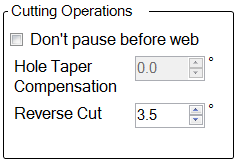
Don’t Pause Before Web can be selected if you do not care to check for slag or dross that may build up on the web of beam or channel after cutting the side flanges. This is usually recommended to be left OFF as excessive slag on the web may cause undesirable cut quality or possible damage to the cutting tip.
Hole Taper Compensation allows a small amount of angular compensation to be added to the torch direction when cutting holes. This can assist in making the sides of holes more perpendicular. There are also a number of other methods that can be employed to achieve better hole quality. This can also lead to some lags in machine motion if set excessively, so it is normally set to 0 degrees. See ART for more information.
Reverse Cut is used to compensate for cuts that are to be carried out in the reverse direction. Normally the Left side of a cut will have excessive taper and the right side of the cut will be more perpendicular to the face. In some occasions it is necessary for the machine to cut with the part on the left side of the cut causing some angle to be present on the cut part. This setting will allow the machine to tilt the torch over a little to compensate for this. Normally set between 2.5 and 5 degrees.
Bevel Cutting @ 45
When cutting a weld prep or bevel cut of any description, the torch must deviate from ideal parameters. For instance, it is necessary for the torch to stand off from the material much further, causing several effects.
Firstly, the greater torch-to-work distance forces the plasma power supply to increase the voltage in order to maintain the specified cutting current. This means more wattage or power is being emitted from the torch. This causes a wider cut width and a tendency to round off the cut faces slightly.
Secondly, the greater distance means the torch tip is less able to control the flow of the plasma gases, also causing a wider and less controlled cut.
Thirdly, the ‘shape’ of the effective cutting beam is often described as being like an upside-down flame. The rounded convex sides of the effective cutting flame/beam means the face of the cut will have a taper that differs from the torch angle.
A good way to calibrate these settings is to do a full 45-degree mitre cut on RHS or PFC. Putting a straight edge or plate across the end of the mitre cut should indicate whether you need to add more or less compensation to bevel cuts.
All bevel angles other than 45 degrees will be scaled automatically from these settings.
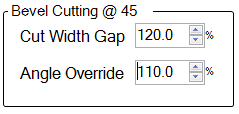
Cut Width Gap is a compensation value to tell the machine to offset more than usual on bevel cuts. This allows for a wider or narrower cut width due to the bevel cut. A value of 110 to 120 percent is usual.
Angle Override is useful for compensating for rounding off of bevelled cuts. Normally a setting of 110 percent would be sufficient. (At 110%, a 45-degree bevel would lean the torch over an extra 10% to 49.5 degrees)
Hole Cutting
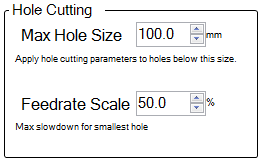
Hole cutting forces the machine to use alternative cutting settings for internal shapes that are smaller than the specified dimension (in either length or width). This includes actual round holes as well as any other shape that falls inside this dimension.
Max Hole Size specifies the size threshold under which the machine will switch to the hole cutting settings
Feed-rate Scale is a setting that allows the machine to slow down the cutting feed-rate more on smaller holes. The feed-rate will scale down to this percentage for the smallest possible hole. This allows for more perpendicular cuts on small holes.
Too low and the small holes will burn away excessively causing over size and poor shape.
Too high and the holes will show excessive taper. Normally this would be set around 50 percent.