
Using the trim settings on PFC
Using the trim setting to adjust the percentage that is trimmed off the start and Finnish of the tool path.
The web trim percentage relates to the thickness of the flange, whereas the flange trim percentage relates to the thickness of the web.
This can be adjusted to suit different cuts such as bevels and notches. This affects all cuts and etches on the Web/Flanges of the section.
The setting is found in “Beamline Settings” and in the “Job” tab of the right-hand menu. The file will need to be reloaded when you change these settings.
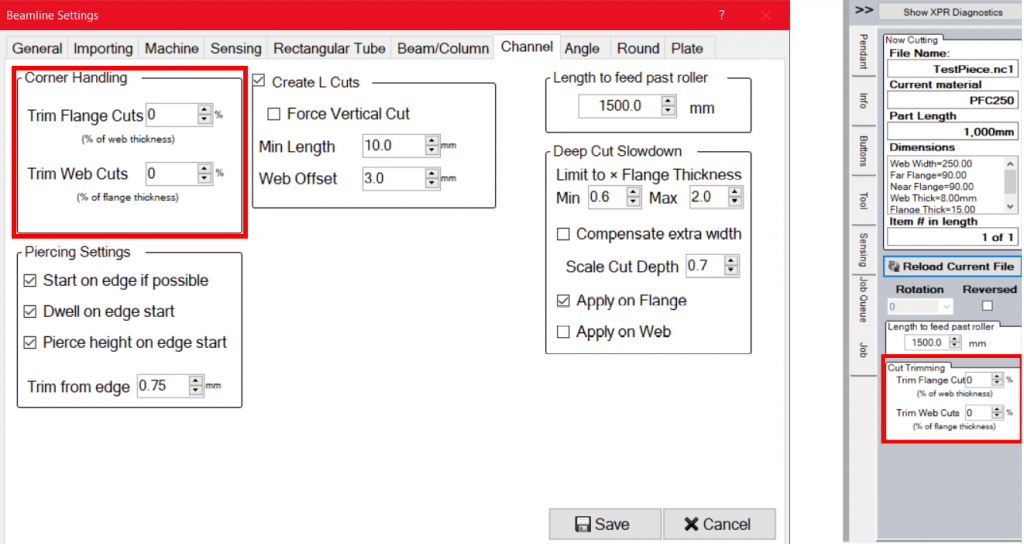
Currently, the settings are on 0% for both the flange and web, you can see the cut starts and ends on the edge of the material. Increasing these values will trim the cuts starting and ending points. This works on the intersecting faces of the section and does not affect cuts on the edge of the flanges. This is helpful as most of the time it is not advised to start on the edge of the material where intersecting cuts are as the plasma may not be able to strike an arc in the cut left previous.
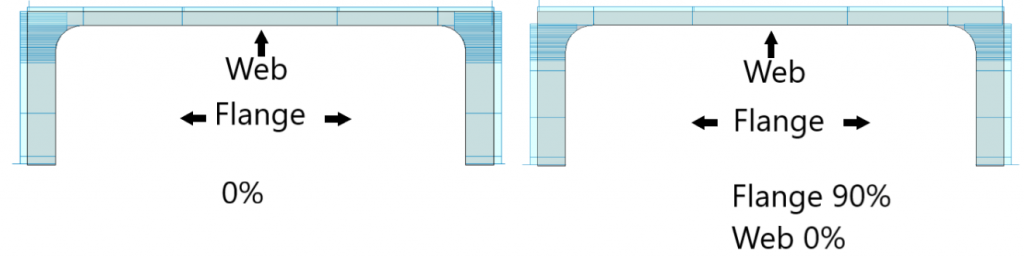
I would recommend using a 90% flange trim and a 0% web trim when cutting straight and bevel cuts, But of course this will depend on what type of cut you are cutting.